
Welcome to another article about digital boardgames! Let’s look at the pros and cons of the most popular web-based board game services.
TL;DR: These are services that allow you to play boardgames on any device that has a web browser. Most of them allow you to play a large number of games, so they can be much cheaper in the long term than buying dedicated adaptations of specific games.
First, let’s look at four popular web-based options.
Board Game Arena

Board Game Arena allows you to create an account for free, and most games are free to play. However, at least one person in your group will need a Premium account if you want to play some of the highest rated games. (It also has a tutorial that teaches you how to use the site, and a tour of the site that lets you choose your preferred setup.)
Boiteajeux

Boiteajeux has a slightly older user interface than Board Game Arena. It has fewer games than Board Game Arena, but many of them are not available on BGA. Also, free is free, right?
Tabletopia

A free account on Tabletopia currently gives you access to about 800 titles. You can also sign up for a Silver or Gold Membership that gives you access to additional features and about 50 premium titles. You can also install the Tabletopia application for Android or Apple devices.
Yucata
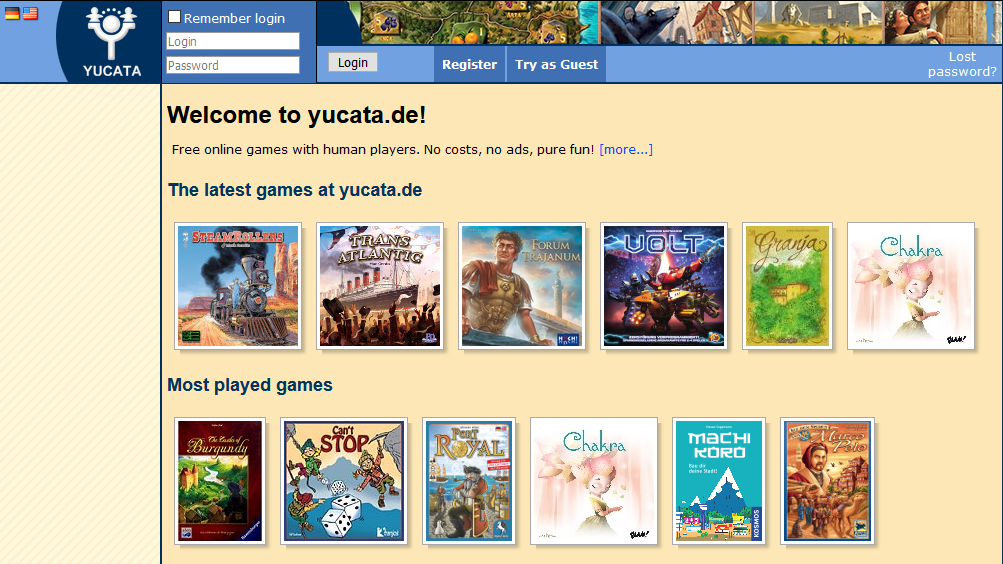
Like Boiteajeux, Yucata has a slightly ‘dated’ UI and fewer games than Board Game Arena. However, ‘free’ is still a great price for about 150 games.
All of these services include copies of each game’s rules, as well as links to ‘how to play’ videos.
The biggest drawback of Boiteajeux, Tabletopia, and Yucata are that the games aren’t fully automated. In other words, the games include basic dice-rolling and card manipulation, but none of the game rules are coded or scripted into the games themselves. Although the games use recogniseable versions of the components, you’ll need to understand the rules as if you were playing a physical boardgame around a table. So you need to read the rulebook and make sure you understand things like the turn order, what the components are and what they’re used for, and what players are supposed to do every turn. (Also, it won’t tell you if you’re doing something incorrectly.)
Board Game Arena’s big advantage over the others is that it includes tutorials to teach you new games, as well as step-by-step instructions on how to play. If you want to learn a game before trying it with other people, you can use the hotseat and training mode to do that. We’ll cover that in a later post, since it requires a bit more explanation. However, at least one person in your group will need a Premium account if you want to play some of the highest rated games. (That includes games like Sushi Go!; 7 Wonders; Carcassonne; and more.) The advantage is that anyone can join a Premium table once it’s started. Either way, you can play excellent games like Takenoko, Seasons, Krosmaster: Arena, and Tokaido, plus most classic games, with a free account. Of course, the free version often restrictions. For example, you’ll need a Premium account to select most of the Krosmasters.
Dedicated boardgame engines
Next, let’s look at one of the most popular options: dedicated boardgame engines. You can think of these as dedicated applications that let you play various games from inside a dedicated interface, instead of through a web browser. These engines require that the people you want to play with either all use the same type of devices (Apple/Mac or Windows devices), or at least that everyone has access to the same device. However, if that describes your group, you should consider one of these options.
Tabletop Simulator

One of the most popular ways to play digital boardgames is Tabletop Simulator. It requires a Steam account, which itself is free, but you’ll need to buy the base application. On the other hand, most of its community-driven content is free to play.
Why is Tabletop Simulator so popular?
The base engine includes a few free (licensed) games, but you can also buy official versions of games as downloadable content (DLC). Both are usually very high quality. The app also includes a number of classic games, as well as basic game components like dice and decks of cards which include all the required game components you need to play pretty much any game you can imagine.
If you’re really bored, you can even upload an image (from your library or a link) and create a custom puzzle.
However, what makes it really popular is its extensive library of boardgames, including a veritable treasure trove of fan-built versions. It also supports features for playing tabletop RPGs, like sets, maps, and miniatures. Together with the dice roller and the decks of cards, this makes it an extremely versatile application.

As with other gaming services discussed so far, you can play with other people in one of three modes: single-player, multiplayer, and hotseat (pass-and-play). Additionally, you can either create your own server or join an existing game online.
A few downsides: The in-game support for these games varies quite drastically from title to title. And like the web- or browser-based games, most games on Tabletop Simulator don’t provide a step-by-step guide to playing them.
Also, you’ll need to know the rules for any game and apply them yourselves (like on Tabletopia), because the application doesn’t include scripts/coding for those. Still, it’s a great feature if you don’t have the physical component or you can’t be in the same room with the other players.
You can currently buy the base engine for about R220, or add it to your Steam wishlist and wait for it to come on sale. Official DLC currently range in price from R36 to R160, with most averaging out to between R60 and R90.
Vassal
Another option is Vassal, which doesn’t require Steam. This is an open-source boardgame engine.

From the site:
Vassal is a game engine for building and playing online adaptations of board games and card games. Play live on the Internet or by email. Vassal runs on all platforms, and is free, open-source software.
http://www.vassalengine.org/
Although it has a rather dated interface, it more than makes up for it through its low hardware demands. That makes it the perfect choice if you’re playing on older devices or over a poor internet connection.
Unlike Tabletop Simulator, both the application and the library community-created modules are free to play. You can download the application for free and access about 2,000 community-driven titles. Like Tabletop Simulator’s fan-made content, the support for this content varies drastically from title to title.
Although it takes a bit of getting used to, and it’s got a pretty steep learning curve, I would definitely recommend checking out this option – especially if you’re unsure whether digital boardgames are your thing.
Weighing up your options
Tabletopia has a dedicated app for Steam. If you already use Steam, you can also add a free copy of its application to your library. You can still play games with friends using a web browser or another device.
For both of Vassal and Tabletop Simulator, you will need to download and add individual games to your library. Otherwise you may never even know about most of the games on offer. Let us know in the comments if you’d like a step-by-step guide for that, or if you have any other questions.
Likewise – which of these systems have you used? What have your experiences/problems been? Let us know!
That’s almost it for this current series about boardgames! Let’s recap what we looked at so far and maybe add a few last bits of advice.
The advantages of playing boardgames online
Digital boardgames are often much cheaper and at least somewhat easier to play than their physical counterparts. You can’t lose or misplace any of the game components; you don’t need room where you live to store them; and when you’re done, you can simply close the interface, knowing that everything will be right where it needs to be the next time you play.
That addresses one of the more time-consuming parts of playing physical boardgames. For digital games, setup usually takes a few clicks rather than half an hour (or more, for some games), which means it’s easier to try out a game as many times as you like. That’s great for when you’re struggling to teach yourself a game. (Also, shuffling is so much faster , easier, and less likely to lead to arguments than physical games. Although you may sometimes feel that the computer-generated randomness isn’t quite as random as it’s supposed to be.)
If you struggle to learn new games or if you’re just getting started, I recommend investing in a couple of boardgames that have built-in tutorials. You can use these to teach yourself – and any friends you want to play with – how each game works. And since most of these games allow you to play online, you should be able to play with anyone regardless of how far away they are. That makes it a great way to hang out with people you haven’t seen in a long time.

The disadvantage is that, while the internet holds the promise of many things, cost and technical hassles don’t always make it easy. Also, although individual games are much cheaper, you can soon find yourself spending a lot more money than you wanted, expected, or planned to, at least if you don’t figure out a few technical details first.
So what kind of technical issues are we talking about?
Some of the issues you may run into
Basically, if you want to play boardgames with people you know, you need to figure out:
- who you want to play with
- which games you want to play
- how you’re going to communicate/hang out
- what devices you’re going to play on
- which (and how many) services to invest time on
Unless you and your friends know of a specific game you’d like to play, you’ll need to decide which of these points is the most important for you.
Most of those don’t qualify as technical issues, necessarily, but we can cover them in a separate series if anyone leaves a comment about that. (Hint, hint!) But each of them comes with a bunch of technical issues you need to consider.
For example: everyone’s internet access is different. Sometimes it’s more expensive, sometimes it’s slower, and if you’re relying on mobile data in South Africa, it’s probably both. So it may be easier for some people to use text chat, or you may have to be a bit patient while someone else waits for a game to refresh. Either way, it’s something to keep in mind.
Also, unless everyone you want to play with has the same type of device, you’ll probably end up playing web-based games. (Unless you’re lucky enough to have enough friends to make up more than one group.) That means that you’ll probably have to teach yourself how the browser-based system works. In fact, you may need to prepare to give your friends a tour of the system or explain how it works. Don’t underestimate how hard it will be for some people to learn a new interface.

A final note (AKA Don’t Be a Dick)
I’ve already got enough ideas and material for another series about boardgames, but that’s it for this one. One final thought, though. A key part of having fun playing games with friends, or anyone really, is that a good attitude goes a long way. That applies whether you’re playing boardgames, card games, roleplaying games, or anything else.
So to repeat my point from earlier: be patient with each other, and remain considerate while you’re playing – even if things get heated or competitive, you’re still supposed to end as friends. Don’t make people regret playing boardgames with you.
And that’s a wrap! Drop a comment below if there is anything else you’d like us to cover, or if you have any specific questions or suggestions.
In the meantime, stay safe, keeping gayming, and don’t take any shit from anyone who hasn’t earned the privilege.

Until then, a final note for any budding boardgame fanatics: BoardGameGeek is an online board gaming community where you can find tons of information, reviews, and resources related to board games. It’s free to join; it’s also a great place to meet other boardgamers.
Two links that you may find particularly useful at the moment are the list of free boardgames, either specifically related to COVID-19 or more generally. From their site:
We are a worldwide community of folks who love board games. We’ve put our heads together to make this guide about games people can play with their friends and family, wherever they are in the world, while staying safely at home.
Games are great way to relax and take your mind off things while spending quality time with family and friends. Gaming is a great way to bring people together, even while we have stay physically apart. In short, now is the time for gaming!
BoardGameGeek.com

